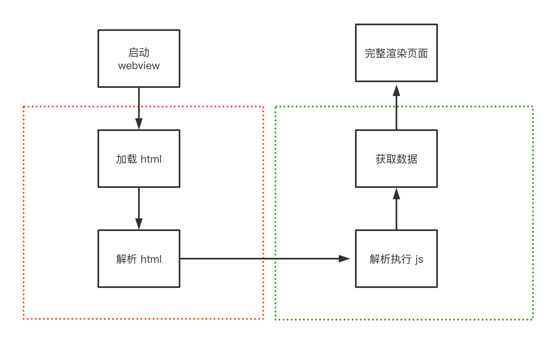
本文介紹了canvas手機(jī)的手勢(shì)解鎖,分享給大家,順便給自己留個(gè)筆記,廢話不多說,具體如下:
按照國(guó)際慣例,先放效果圖

1、js動(dòng)態(tài)初始化Dom結(jié)構(gòu)
首先在index.html中添加基本樣式
body{background:pink;text-align: center;}加個(gè)移動(dòng)端meta頭
<meta name="viewport" content="width=device-width,initial-scale=1.0,user-scalable=no">
引入index.js腳本
<script src="index.js"></script>
index.js
// 匿名函數(shù)自執(zhí)行(function(){ // canvasLock是全局對(duì)象 window.canvasLock=function(obj){ this.width=obj.width; this.height=obj.height; } //動(dòng)態(tài)生成DOM canvasLock.prototype.initDom=function(){ //創(chuàng)建一個(gè)div var div=document.createElement("div"); var h4="<h4 id='title' class='title'>繪制解鎖圖案</h4>"; div.innerHTML=h4; div.setAttribute("style","position:absolute;top:0;left:0;right:0;bottom:0;"); //創(chuàng)建canvas var canvas=document.createElement("canvas"); canvas.setAttribute("id","canvas"); //cssText 的本質(zhì)就是設(shè)置 HTML 元素的 style 屬性值 canvas.style.cssText="background:pink;display:inine-block;margin-top:15px;"; div.appendChild(canvas); document.body.appendChild(div); //設(shè)置canvas默認(rèn)寬高 var width=this.width||300; var height=this.height||300; canvas.style.width=width+"px"; canvas.style.height=height+"px"; canvas.width=width; canvas.height=height; } //init代表初始化,程序的入口 canvasLock.prototype.init=function(){ //動(dòng)態(tài)生成DOM this.initDom(); //創(chuàng)建畫布 this.canvas=document.getElementById("canvas"); this.ctx=this.canvas.getContext("2d"); }})();在index.html中創(chuàng)建實(shí)例并初始化
new canvasLock({}).init();效果圖

2、 畫圓函數(shù)
需要補(bǔ)充一下畫布寬度與圓的半徑的關(guān)系
如果一行3個(gè)圓,則有4個(gè)間距,間距的寬度與圓的直徑相同,相當(dāng)于7個(gè)直徑,即14個(gè)半徑
如果一行4個(gè)圓,則有5個(gè)間距,間距的寬度與圓的直徑相同,相當(dāng)于9個(gè)直徑,即18個(gè)半徑
如果一行n個(gè)圓,則有n+1個(gè)間距,間距的寬度與圓的直徑相同,相當(dāng)于2n+1個(gè)直徑,即4n+2個(gè)半徑

補(bǔ)充兩個(gè)方法:
//以給定坐標(biāo)點(diǎn)為圓心畫出單個(gè)圓 canvasLock.prototype.drawCircle=function(x,y){ this.ctx.strokeStyle="#abcdef"; this.ctx.lineWidth=2; this.ctx.beginPath(); this.ctx.arc(x,y,this.r,0,2*Math.PI,true); this.ctx.closePath(); this.ctx.stroke(); } //繪制出所有的圓 canvasLock.prototype.createCircle=function(){ var n=this.circleNum;//一行幾個(gè)圓 var count=0; this.r=this.canvas.width/(4*n+2);//公式計(jì)算出每個(gè)圓的半徑 this.lastPoint=[];//儲(chǔ)存點(diǎn)擊過的圓的信息 this.arr=[];//儲(chǔ)存所有圓的信息 this.restPoint=[];//儲(chǔ)存未被點(diǎn)擊的圓的信息 var r=this.r; for(var i=0;i<n;i++){ for(var j=0;j<n;j++){ count++; var obj={ x:(4*j+3)*r, y:(4*i+3)*r, index:count//給每個(gè)圓標(biāo)記索引 }; this.arr.push(obj); this.restPoint.push(obj);//初始化時(shí)為所有點(diǎn) } } //清屏 this.ctx.clearRect(0,0,this.canvas.width,this.canvas.height); //以給定坐標(biāo)點(diǎn)為圓心畫出所有圓 for(var i=0;i<this.arr.length;i++){ //循環(huán)調(diào)用畫單個(gè)圓的方法 this.drawCircle(this.arr[i].x,this.arr[i].y); } }初始化的時(shí)候記得調(diào)用
canvasLock.prototype.init=function(){ //動(dòng)態(tài)生成DOM this.initDom(); //創(chuàng)建畫布 this.canvas=document.getElementById("canvas"); this.ctx=this.canvas.getContext("2d"); //繪制出所有的圓 this.createCircle(); }別忘了在index.html中實(shí)例化時(shí)傳入?yún)?shù)(一行定義幾個(gè)圓)
new canvasLock({circleNum:3}).init();效果圖

3、canvas事件操作——實(shí)現(xiàn)畫圓和畫線
getPosition方法用來得到鼠標(biāo)觸摸點(diǎn)離canvas的距離(左邊和上邊)
canvasLock.prototype.getPosition=function(e){ var rect=e.currentTarget.getBoundingClientRect();//獲得canvas距離屏幕的上下左右距離 var po={ //鼠標(biāo)與視口的左距離 - canvas距離視口的左距離 = 鼠標(biāo)與canvas的左距離 x:(e.touches[0].clientX-rect.left), //鼠標(biāo)與視口的上距離 - canvas距離視口的上距離 = 鼠標(biāo)距離canvas的上距離 y:(e.touches[0].clientY-rect.top) }; return po; }給canvas添加 touchstart 事件,判斷觸摸點(diǎn)是否在圓內(nèi)
觸摸點(diǎn)在圓內(nèi)則允許拖拽,并將該圓添加到 lastPoint 中,從 restPoint 中剔除
this.canvas.addEventListener("touchstart",function(e){ var po=self.getPosition(e);//鼠標(biāo)距離canvas的距離 //判斷是否在圓內(nèi) for(var i=0;i<self.arr.lenth;i++){ if(Math.abs(po.x-self.arr[i].x)<self.r && Math.abs(po.y-self.arr[i].y)<self.r){ self.touchFlag=true;//允許拖拽 self.lastPoint.push(self.arr[i]);//點(diǎn)擊過的點(diǎn) self.restPoint.splice(i,1);//剩下的點(diǎn)剔除這個(gè)被點(diǎn)擊的點(diǎn) break; } } },false);判斷是否在圓內(nèi)的原理:
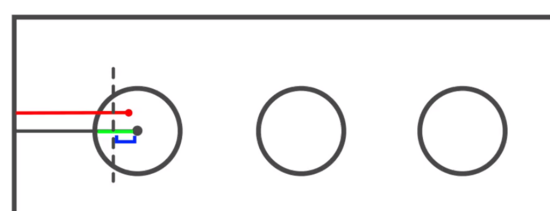
圓心的x軸偏移和鼠標(biāo)點(diǎn)的x軸偏移的距離的絕對(duì)值小于半徑
并且
圓心的y軸偏移和鼠標(biāo)點(diǎn)的y軸偏移的距離的絕對(duì)值小于半徑
則可以判斷鼠標(biāo)位于圓內(nèi)
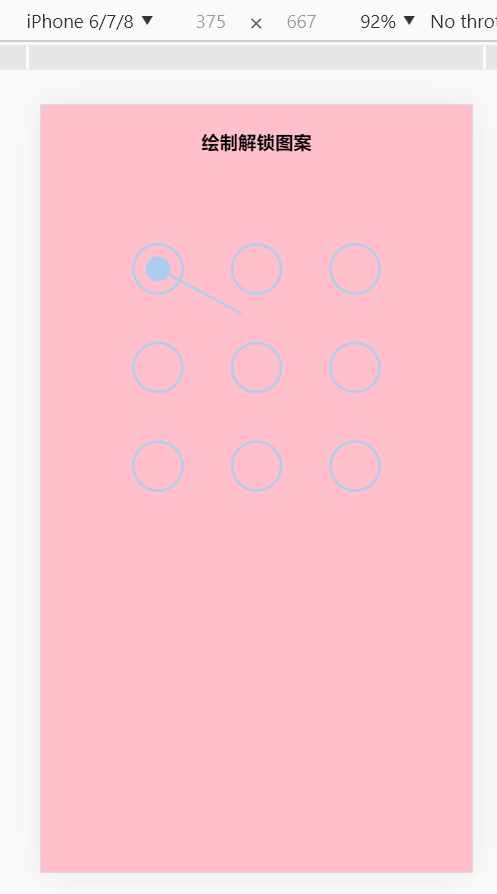
給touchmove綁定事件,在觸摸點(diǎn)移動(dòng)時(shí)給點(diǎn)擊過的圓畫上實(shí)心圓,并畫線
//觸摸點(diǎn)移動(dòng)時(shí)的動(dòng)畫 canvasLock.prototype.update=function(po){ //清屏,canvas動(dòng)畫前必須清空原來的內(nèi)容 this.ctx.clearRect(0,0,this.canvas.width,this.canvas.height); //以給定坐標(biāo)點(diǎn)為圓心畫出所有圓 for(var i=0;i<this.arr.length;i++){ this.drawCircle(this.arr[i].x,this.arr[i].y); } this.drawPoint();//點(diǎn)擊過的圓畫實(shí)心圓 this.drawLine(po);//畫線 } //畫實(shí)心圓 canvasLock.prototype.drawPoint=function(){ for(var i=0;i<this.lastPoint.length;i++){ this.ctx.fillStyle="#abcdef"; this.ctx.beginPath(); this.ctx.arc(this.lastPoint[i].x,this.lastPoint[i].y,this.r/2,0,2*Math.PI,true); this.ctx.closePath(); this.ctx.fill(); } } //畫線 canvasLock.prototype.drawLine=function(po){ this.ctx.beginPath(); this.lineWidth=3; this.ctx.moveTo(this.lastPoint[0].x,this.lastPoint[0].y);//線條起點(diǎn) for(var i=1;i<this.lastPoint.length;i++){ this.ctx.lineTo(this.lastPoint[i].x,this.lastPoint[i].y); } this.ctx.lineTo(po.x,po.y);//觸摸點(diǎn) this.ctx.stroke(); this.ctx.closePath(); }效果圖
4、canvas手勢(shì)鏈接操作實(shí)現(xiàn)
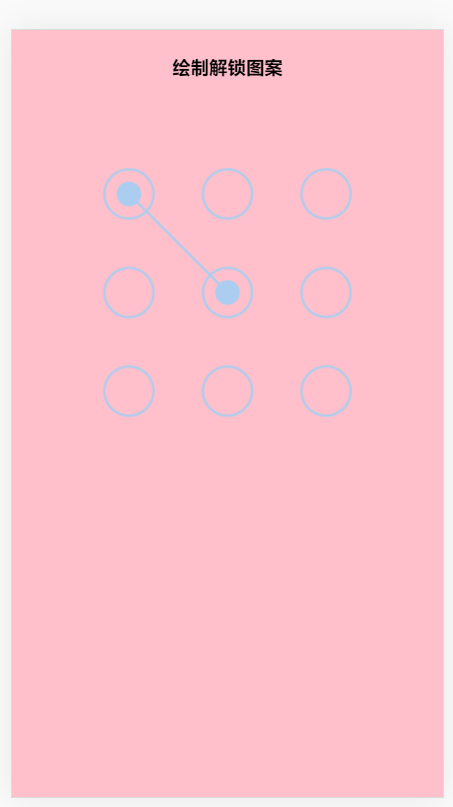
在touchmove中補(bǔ)充當(dāng)碰到下一個(gè)目標(biāo)圓時(shí)的操作
//碰到下一個(gè)圓時(shí)只需要push到lastPoint當(dāng)中去 for(var i=0;i<this.restPoint.length;i++){ if((Math.abs(po.x-this.restPoint[i].x)<this.r) && (Math.abs(po.y-this.restPoint[i].y)<this.r)){ this.lastPoint.push(this.restPoint[i]);//將這個(gè)新點(diǎn)擊到的點(diǎn)存入lastPoint this.restPoint.splice(i,1);//從restPoint中剔除這個(gè)新點(diǎn)擊到的點(diǎn) break; } }效果圖
5、解鎖成功與否的判斷
//設(shè)置密碼 canvasLock.prototype.storePass=function(){ if(this.checkPass()){ document.getElementById("title").innerHTML="解鎖成功"; this.drawStatusPoint("lightgreen"); }else{ document.getElementById("title").innerHTML="解鎖失敗"; this.drawStatusPoint("orange"); } } //判斷輸入的密碼 canvasLock.prototype.checkPass=function(){ var p1="123",//成功的密碼 p2=""; for(var i=0;i<this.lastPoint.length;i++){ p2+=this.lastPoint[i].index; } return p1===p2; } //繪制判斷結(jié)束后的狀態(tài) canvasLock.prototype.drawStatusPoint=function(type){ for(var i=0;i<this.lastPoint.length;i++){ this.ctx.strokeStyle=type; this.ctx.beginPath(); this.ctx.arc(this.lastPoint[i].x,this.lastPoint[i].y,this.r,0,2*Math.PI,true); this.ctx.closePath(); this.ctx.stroke(); } } //程序全部結(jié)束后重置 canvasLock.prototype.reset=function(){ this.createCircle(); }大功告成!!下面曬出所有代碼
index.html
<!DOCTYPE html><html lang="en"><head> <meta charset="UTF-8"> <title>手勢(shì)解鎖</title> <!-- 移動(dòng)端meta頭 --> <meta name="viewport" content="width=device-width,initial-scale=1.0,user-scalable=no"> <style> body{background:pink;text-align: center;} </style></head><body> <script src="index.js"></script> <script> // circleNum:3 表示一行3個(gè)圓 new canvasLock({circleNum:3}).init(); </script> </body></html>index.js
// 匿名函數(shù)自執(zhí)行(function(){ // canvasLock是全局對(duì)象 window.canvasLock=function(obj){ this.width=obj.width; this.height=obj.height; this.circleNum=obj.circleNum; } //動(dòng)態(tài)生成DOM canvasLock.prototype.initDom=function(){ //創(chuàng)建一個(gè)div var div=document.createElement("div"); var h4="<h4 id='title' class='title'>繪制解鎖圖案</h4>"; div.innerHTML=h4; div.setAttribute("style","position:absolute;top:0;left:0;right:0;bottom:0;"); //創(chuàng)建canvas var canvas=document.createElement("canvas"); canvas.setAttribute("id","canvas"); //cssText 的本質(zhì)就是設(shè)置 HTML 元素的 style 屬性值 canvas.style.cssText="background:pink;display:inine-block;margin-top:15px;"; div.appendChild(canvas); document.body.appendChild(div); //設(shè)置canvas默認(rèn)寬高 var width=this.width||300; var height=this.height||300; canvas.style.width=width+"px"; canvas.style.height=height+"px"; canvas.width=width; canvas.height=height; } //以給定坐標(biāo)點(diǎn)為圓心畫出單個(gè)圓 canvasLock.prototype.drawCircle=function(x,y){ this.ctx.strokeStyle="#abcdef"; this.ctx.lineWidth=2; this.ctx.beginPath(); this.ctx.arc(x,y,this.r,0,2*Math.PI,true); this.ctx.closePath(); this.ctx.stroke(); } //繪制出所有的圓 canvasLock.prototype.createCircle=function(){ var n=this.circleNum;//一行幾個(gè)圓 var count=0; this.r=this.canvas.width/(4*n+2);//公式計(jì)算出每個(gè)圓的半徑 this.lastPoint=[];//儲(chǔ)存點(diǎn)擊過的圓的信息 this.arr=[];//儲(chǔ)存所有圓的信息 this.restPoint=[];//儲(chǔ)存未被點(diǎn)擊的圓的信息 var r=this.r; for(var i=0;i<n;i++){ for(var j=0;j<n;j++){ count++; var obj={ x:(4*j+3)*r, y:(4*i+3)*r, index:count//給每個(gè)圓標(biāo)記索引 }; this.arr.push(obj); this.restPoint.push(obj);//初始化時(shí)為所有點(diǎn) } } //清屏 this.ctx.clearRect(0,0,this.canvas.width,this.canvas.height); //以給定坐標(biāo)點(diǎn)為圓心畫出所有圓 for(var i=0;i<this.arr.length;i++){ //循環(huán)調(diào)用畫單個(gè)圓的方法 this.drawCircle(this.arr[i].x,this.arr[i].y); } } //添加事件 canvasLock.prototype.bindEvent=function(){ var self=this; this.canvas.addEventListener("touchstart",function(e){ var po=self.getPosition(e);//鼠標(biāo)距離canvas的距離 //判斷是否在圓內(nèi) for(var i=0;i<self.arr.length;i++){ if((Math.abs(po.x-self.arr[i].x)<self.r) && (Math.abs(po.y-self.arr[i].y)<self.r)){ self.touchFlag=true;//允許拖拽 self.lastPoint.push(self.arr[i]);//點(diǎn)擊過的點(diǎn) self.restPoint.splice(i,1);//剩下的點(diǎn)剔除這個(gè)被點(diǎn)擊的點(diǎn) break; } } },false); this.canvas.addEventListener("touchmove",function(e){ if(self.touchFlag){ //觸摸點(diǎn)移動(dòng)時(shí)的動(dòng)畫 self.update(self.getPosition(e)); } },false); //觸摸離開時(shí) this.canvas.addEventListener("touchend",function(e){ if(self.touchFlag){ self.storePass(self.lastPoint); setTimeout(function(){ self.reset(); },300); } },false); } //設(shè)置密碼 canvasLock.prototype.storePass=function(){ if(this.checkPass()){ document.getElementById("title").innerHTML="解鎖成功"; this.drawStatusPoint("lightgreen"); }else{ document.getElementById("title").innerHTML="解鎖失敗"; this.drawStatusPoint("orange"); } } //判斷輸入的密碼 canvasLock.prototype.checkPass=function(){ var p1="123",//成功的密碼 p2=""; for(var i=0;i<this.lastPoint.length;i++){ p2+=this.lastPoint[i].index; } return p1===p2; } //繪制判斷結(jié)束后的狀態(tài) canvasLock.prototype.drawStatusPoint=function(type){ for(var i=0;i<this.lastPoint.length;i++){ this.ctx.strokeStyle=type; this.ctx.beginPath(); this.ctx.arc(this.lastPoint[i].x,this.lastPoint[i].y,this.r,0,2*Math.PI,true); this.ctx.closePath(); this.ctx.stroke(); } } //程序全部結(jié)束后重置 canvasLock.prototype.reset=function(){ this.createCircle(); } //獲取鼠標(biāo)點(diǎn)擊處離canvas的距離 canvasLock.prototype.getPosition=function(e){ var rect=e.currentTarget.getBoundingClientRect();//獲得canvas距離屏幕的上下左右距離 var po={ //鼠標(biāo)與視口的左距離 - canvas距離視口的左距離 = 鼠標(biāo)與canvas的左距離 x:(e.touches[0].clientX-rect.left), //鼠標(biāo)與視口的上距離 - canvas距離視口的上距離 = 鼠標(biāo)距離canvas的上距離 y:(e.touches[0].clientY-rect.top) }; return po; } //觸摸點(diǎn)移動(dòng)時(shí)的動(dòng)畫 canvasLock.prototype.update=function(po){ //清屏,canvas動(dòng)畫前必須清空原來的內(nèi)容 this.ctx.clearRect(0,0,this.canvas.width,this.canvas.height); //以給定坐標(biāo)點(diǎn)為圓心畫出所有圓 for(var i=0;i<this.arr.length;i++){ this.drawCircle(this.arr[i].x,this.arr[i].y); } // 鼠標(biāo)每移動(dòng)一下都會(huì)重繪canvas,update操作相當(dāng)于每一個(gè)move事件都會(huì)觸發(fā) this.drawPoint();//點(diǎn)擊過的圓畫實(shí)心圓 this.drawLine(po);//畫線 //碰到下一個(gè)圓時(shí)只需要push到lastPoint當(dāng)中去 for(var i=0;i<this.restPoint.length;i++){ if((Math.abs(po.x-this.restPoint[i].x)<this.r) && (Math.abs(po.y-this.restPoint[i].y)<this.r)){ this.lastPoint.push(this.restPoint[i]);//將這個(gè)新點(diǎn)擊到的點(diǎn)存入lastPoint this.restPoint.splice(i,1);//從restPoint中剔除這個(gè)新點(diǎn)擊到的點(diǎn) break; } } } //畫實(shí)心圓 canvasLock.prototype.drawPoint=function(){ for(var i=0;i<this.lastPoint.length;i++){ this.ctx.fillStyle="#abcdef"; this.ctx.beginPath(); this.ctx.arc(this.lastPoint[i].x,this.lastPoint[i].y,this.r/2,0,2*Math.PI,true); this.ctx.closePath(); this.ctx.fill(); } } //畫線 canvasLock.prototype.drawLine=function(po){ this.ctx.beginPath(); this.lineWidth=3; this.ctx.moveTo(this.lastPoint[0].x,this.lastPoint[0].y);//線條起點(diǎn) for(var i=1;i<this.lastPoint.length;i++){ this.ctx.lineTo(this.lastPoint[i].x,this.lastPoint[i].y); } this.ctx.lineTo(po.x,po.y);//觸摸點(diǎn) this.ctx.stroke(); this.ctx.closePath(); } //init代表初始化,程序的入口 canvasLock.prototype.init=function(){ //動(dòng)態(tài)生成DOM this.initDom(); //創(chuàng)建畫布 this.canvas=document.getElementById("canvas"); this.ctx=this.canvas.getContext("2d"); //默認(rèn)不允許拖拽 this.touchFlag=false; //繪制出所有的圓 this.createCircle(); //添加事件 this.bindEvent(); }})();到此這篇關(guān)于canvas實(shí)現(xiàn)手機(jī)的手勢(shì)解鎖的步驟詳細(xì) 的文章就介紹到這了,更多相關(guān)canvas手勢(shì)解鎖內(nèi)容請(qǐng)搜索武林網(wǎng)以前的文章或繼續(xù)瀏覽下面的相關(guān)文章,希望大家以后多多支持武林網(wǎng)!
新聞熱點(diǎn)





疑難解答
圖片精選