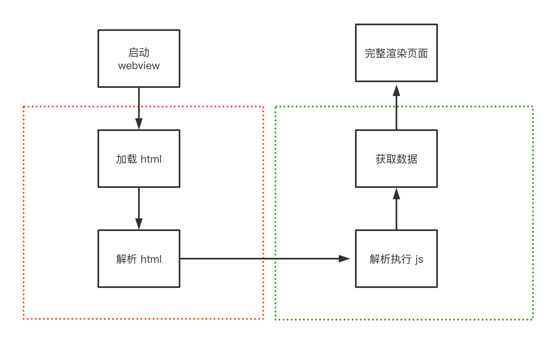
最近在寫移動(dòng)端 H5 應(yīng)用,遇到一個(gè)值得記錄下來的點(diǎn)。現(xiàn)在從它的由來到實(shí)現(xiàn),我們來聊一下移動(dòng)端 1px,說 1px 不夠準(zhǔn)確,應(yīng)該說成 1 物理像素 。
通過閱讀下面文章,你將會(huì)理解以下問題:
問題
由來
基本概念
首先,我們要了解兩個(gè)概念,一個(gè)是 像素(pixel) 可以簡(jiǎn)寫為 px ,另外一個(gè)是 設(shè)備像素比(DPR)
像素 :指在由一個(gè)數(shù)字序列表示的圖像中的一個(gè)最小單元,單位是 px,不可再次分割了。
設(shè)備像素比(DPR): 設(shè)備像素比 = 設(shè)備像素 / 設(shè)備獨(dú)立像素。復(fù)制代碼
下面我來簡(jiǎn)單解釋下幾個(gè)概念
參考數(shù)據(jù)
各種類型的 iphone 手機(jī)屏幕設(shè)備的參數(shù)
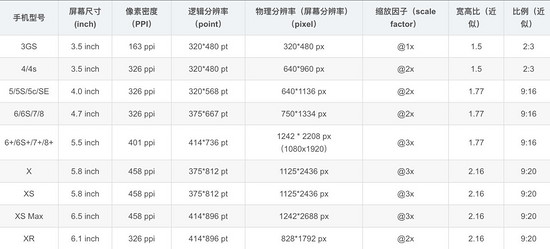
注:這里的縮放因子呢,就是 DRP 的值
設(shè)計(jì)稿對(duì)比數(shù)據(jù)

會(huì)有人好奇,為什么設(shè)計(jì)稿上顯示是 750x1334 呢,這是因?yàn)樵O(shè)計(jì)稿是顯示的 物理像素
而我們 css 中的像素是 邏輯像素 應(yīng)該為 375x 667,在編寫代碼時(shí)要將自定義寬度設(shè)置成 375px

那么此時(shí)設(shè)計(jì)稿上的 1px 寬度實(shí)際代表的 css 參數(shù)應(yīng)該是 0.5px 對(duì)應(yīng)物理像素 1px,那么怎么實(shí)現(xiàn)這個(gè)物理像素為 1px 呢
實(shí)踐
歸根結(jié)底有兩種方案,一種是利用 css 中的 transfrom:scaleY(0.5) ,另一種是設(shè)置 媒體查詢根據(jù)不同 DPR 縮放
解決方案一
原理
利用 css 的 偽元素 ::after + transfrom 進(jìn)行縮放
為什么用偽元素?因?yàn)閭卧?::after 或 ::before 是獨(dú)立于當(dāng)前元素,可以單獨(dú)對(duì)其縮放而不影響元素本身的縮放
偽元素大多數(shù)瀏覽器默認(rèn)單引號(hào)也可以使用,和偽類一樣形式,而且單引號(hào)兼容性(ie)更好些
實(shí)現(xiàn)
<div class="cell border-1px"> cell <div><style>.cell { width: 100px; height: 100px;}<!--全部邊框-->.border-1px:after { content: ''; position: absolute; box-sizing: border-box; top: 0; left: 0; width: 200%; height: 200%; border: 1px solid #000; border-radius: 4px; -webkit-transform: scale(0.5); transform: scale(0.5); -webkit-transform-origin: top left;}<!--單邊框,以上邊框?yàn)槔?->.border-1px-top:before { content: ""; position: absolute; top: 0; left: 0; right: 0; border-top: 1px solid red; transform: scaleY(.5); transform-origin: left top;}</style>解決方案二(升級(jí)方案一)
原理
使用 less 對(duì)公共代碼(方案一)封裝,同時(shí)增加媒體查詢分別對(duì)不同 DPR 的設(shè)備,進(jìn)行不同的縮放
.border( @borderWidth: 1px; @borderStyle: solid; @borderColor: @lignt-gray-color; @borderRadius: 0) { position: relative; &:before { content: ''; position: absolute; width: 98%; height: 98%; top: 0; left: 0; transform-origin: left top; -webkit-transform-origin: left top; box-sizing: border-box; pointer-events: none; } @media (-webkit-min-device-pixel-ratio: 2) { &:before { width: 200%; height: 200%; -webkit-transform: scale(.5); } } @media (-webkit-min-device-pixel-ratio: 2.5) { &:before { width: 250%; height: 250%; -webkit-transform: scale(.4); } } @media (-webkit-min-device-pixel-ratio: 2.75) { &:before { width: 275%; height: 275%; -webkit-transform: scale(1 / 2.75); } } @media (-webkit-min-device-pixel-ratio: 3) { &:before { width: 300%; height: 300%; transform: scale(1 / 3); -webkit-transform: scale(1 / 3); } } .border-radius(@borderRadius); &:before { border-width: @borderWidth; border-style: @borderStyle; border-color: @borderColor; }}.border-all( @borderWidth: 1px; @borderStyle: solid; @borderColor: @lignt-gray-color; @borderRadius: 0) { .border(@borderWidth; @borderStyle; @borderColor; @borderRadius);}其他方案:
使用圖片:兼容性最好,靈活行最差,不能改變顏色、長(zhǎng)度
使用 viewport 和 rem , js 動(dòng)態(tài)改變 viewport 中 scale 縮放,缺點(diǎn)在于不適用于已有的項(xiàng)目,例如:使用 vh 和 vw 布局的
<meta name="viewport" id="WebViewport" content="initial-scale=1, maximum-scale=1, minimum-scale=1, user-scalable=no">
使用 css 漸變 linear-gradient 或者 box-shadow
上述 3 種方案均有致命缺陷暫不推薦使用
兼容性
最后看一下兼容性如何,主要是偽元素、 transform:scale 和 min-device-pixel-ratio 這幾個(gè)關(guān)鍵詞的兼容性


開源庫的解決方案
vant 組件庫
跳去 github 查看相關(guān)代碼
使用 less 寫的
.hairline-common() { position: absolute; box-sizing: border-box; content: ' '; pointer-events: none;}.hairline(@color: @border-color) { .hairline-common(); top: -50%; right: -50%; bottom: -50%; left: -50%; border: 0 solid @color; transform: scale(0.5);}也是采用第一種解決方案
ant-design-mobile 組件庫
跳去 github 查看相關(guān)代碼
.scale-hairline-common(@color, @top, @right, @bottom, @left) { content: ''; position: absolute; background-color: @color; display: block; z-index: 1; top: @top; right: @right; bottom: @bottom; left: @left;}.hairline(@direction, @color: @border-color-base) when (@direction = 'top') { border-top: 1PX solid @color; html:not([data-scale]) & { @media (min-resolution: 2dppx) { border-top: none; &::before { .scale-hairline-common(@color, 0, auto, auto, 0); width: 100%; height: 1PX; transform-origin: 50% 50%; transform: scaleY(0.5); @media (min-resolution: 3dppx) { transform: scaleY(0.33); } } } }}.hairline(@direction, @color: @border-color-base) when (@direction = 'right') { border-right: 1PX solid @color; html:not([data-scale]) & { @media (min-resolution: 2dppx) { border-right: none; &::after { .scale-hairline-common(@color, 0, 0, auto, auto); width: 1PX; height: 100%; background: @color; transform-origin: 100% 50%; transform: scaleX(0.5); @media (min-resolution: 3dppx) { transform: scaleX(0.33); } } } }}.hairline(@direction, @color: @border-color-base) when (@direction = 'bottom') { border-bottom: 1PX solid @color; html:not([data-scale]) & { @media (min-resolution: 2dppx) { border-bottom: none; &::after { .scale-hairline-common(@color, auto, auto, 0, 0); width: 100%; height: 1PX; transform-origin: 50% 100%; transform: scaleY(0.5); @media (min-resolution: 3dppx) { transform: scaleY(0.33); } } } }}.hairline(@direction, @color: @border-color-base) when (@direction = 'left') { border-left: 1PX solid @color; html:not([data-scale]) & { @media (min-resolution: 2dppx) { border-left: none; &::before { .scale-hairline-common(@color, 0, auto, auto, 0); width: 1PX; height: 100%; transform-origin: 100% 50%; transform: scaleX(0.5); @media (min-resolution: 3dppx) { transform: scaleX(0.33); } } } }}.hairline(@direction, @color: @border-color-base, @radius: 0) when (@direction = 'all') { border: 1PX solid @color; border-radius: @radius; html:not([data-scale]) & { @media (min-resolution: 2dppx) { position: relative; border: none; &::before { content: ''; position: absolute; left: 0; top: 0; width: 200%; height: 200%; border: 1PX solid @color; border-radius: @radius * 2; transform-origin: 0 0; transform: scale(0.5); box-sizing: border-box; pointer-events: none; // @media (min-resolution: 3dppx) { // width: 300%; // height: 300%; // border-radius: @radius * 3; // transform: scale(0.33); // } } } }}這個(gè)值得研究下,比 vant 和 第一種解決方案有點(diǎn)不同,主要在于處理了 DPR 為 2 和為 3 的兩種情況,相比來說更加完善。
這里 PX 大寫,為了防止插件將 px 轉(zhuǎn)成 rem 等單位
總結(jié)
通過該文,你大概了解 1px 問題的來龍去脈了吧,也明白了如何解決相關(guān)問題,如果這票文章能解決你的疑問或者工作中問題,不妨點(diǎn)個(gè)贊收藏下。
由于技術(shù)水平有限,文章中如有錯(cuò)誤地方,請(qǐng)?jiān)谠u(píng)論區(qū)指出,感謝!
以上就是本文的全部?jī)?nèi)容,希望對(duì)大家的學(xué)習(xí)有所幫助,也希望大家多多支持武林網(wǎng)。
新聞熱點(diǎn)




疑難解答
圖片精選