public class Dialog_AlertDialogDemoActivity extends Activity { /** Called when the activity is first created. */ @Override public void onCreate(Bundle savedInstanceState) { super.onCreate(savedInstanceState); setContentView(R.layout.main);
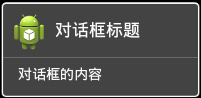
Dialog alertDialog = new AlertDialog.Builder(this). setTitle("對(duì)話框的標(biāo)題"). setMessage("對(duì)話框的內(nèi)容"). setIcon(R.drawable.ic_launcher). create(); alertDialog.show(); } } package com.tianjf; import android.app.Activity; import android.app.AlertDialog; import android.app.Dialog; import android.os.Bundle; public class Dialog_AlertDialogDemoActivity extends Activity { /** Called when the activity is first created. */ @Override public void onCreate(Bundle savedInstanceState) { super.onCreate(savedInstanceState); setContentView(R.layout.main); Dialog alertDialog = new AlertDialog.Builder(this). setTitle("對(duì)話框的標(biāo)題"). setMessage("對(duì)話框的內(nèi)容"). setIcon(R.drawable.ic_launcher). create(); alertDialog.show(); } }運(yùn)行結(jié)果如下:
public class Dialog_AlertDialogDemoActivity extends Activity { /** Called when the activity is first created. */ @Override public void onCreate(Bundle savedInstanceState) { super.onCreate(savedInstanceState); setContentView(R.layout.main);
Dialog alertDialog = new AlertDialog.Builder(this). setTitle("確定刪除?"). setMessage("您確定刪除該條信息嗎?"). setIcon(R.drawable.ic_launcher). setPositiveButton("確定", new DialogInterface.OnClickListener() {
@Override public void onClick(DialogInterface dialog, int which) { // TODO Auto-generated method stub } }). setNegativeButton("取消", new DialogInterface.OnClickListener() {
@Override public void onClick(DialogInterface dialog, int which) { // TODO Auto-generated method stub } }). setNeutralButton("查看詳情", new DialogInterface.OnClickListener() {
@Override public void onClick(DialogInterface dialog, int which) { // TODO Auto-generated method stub } }). create(); alertDialog.show(); } } package com.tianjf; import android.app.Activity; import android.app.AlertDialog; import android.app.Dialog; import android.content.DialogInterface; import android.os.Bundle; public class Dialog_AlertDialogDemoActivity extends Activity { /** Called when the activity is first created. */ @Override public void onCreate(Bundle savedInstanceState) { super.onCreate(savedInstanceState); setContentView(R.layout.main); Dialog alertDialog = new AlertDialog.Builder(this). setTitle("確定刪除?"). setMessage("您確定刪除該條信息嗎?"). setIcon(R.drawable.ic_launcher). setPositiveButton("確定", new DialogInterface.OnClickListener() {
@Override public void onClick(DialogInterface dialog, int which) { // TODO Auto-generated method stub } }). setNegativeButton("取消", new DialogInterface.OnClickListener() {
@Override public void onClick(DialogInterface dialog, int which) { // TODO Auto-generated method stub } }). setNeutralButton("查看詳情", new DialogInterface.OnClickListener() {
@Override public void onClick(DialogInterface dialog, int which) { // TODO Auto-generated method stub } }). create(); alertDialog.show(); } }在這個(gè)例子中,我們定義了三個(gè)按鈕,分別是"Yes"按鈕,"No"按鈕以及一個(gè)普通按鈕,每個(gè)按鈕都有onClick事件,TODO的地方可以放點(diǎn)了按鈕之后想要做的一些處理 看一下運(yùn)行結(jié)果:
public class Dialog_AlertDialogDemoActivity extends Activity { /** Called when the activity is first created. */ @Override public void onCreate(Bundle savedInstanceState) { super.onCreate(savedInstanceState); setContentView(R.layout.main);
final String[] arrayFruit = new String[] { "蘋(píng)果", "橘子", "草莓", "香蕉" };
Dialog alertDialog = new AlertDialog.Builder(this). setTitle("你喜歡吃哪種水果?"). setIcon(R.drawable.ic_launcher) .setItems(arrayFruit, new DialogInterface.OnClickListener() {
@Override public void onClick(DialogInterface dialog, int which) { Toast.makeText(Dialog_AlertDialogDemoActivity.this, arrayFruit[which], Toast.LENGTH_SHORT).show(); } }). setNegativeButton("取消", new DialogInterface.OnClickListener() {
@Override public void onClick(DialogInterface dialog, int which) { // TODO Auto-generated method stub } }). create(); alertDialog.show(); } } package com.tianjf; import android.app.Activity; import android.app.AlertDialog; import android.app.Dialog; import android.content.DialogInterface; import android.os.Bundle; import android.widget.Toast; public class Dialog_AlertDialogDemoActivity extends Activity { /** Called when the activity is first created. */ @Override public void onCreate(Bundle savedInstanceState) { super.onCreate(savedInstanceState); setContentView(R.layout.main); final String[] arrayFruit = new String[] { "蘋(píng)果", "橘子", "草莓", "香蕉" }; Dialog alertDialog = new AlertDialog.Builder(this). setTitle("你喜歡吃哪種水果?"). setIcon(R.drawable.ic_launcher) .setItems(arrayFruit, new DialogInterface.OnClickListener() {
@Override public void onClick(DialogInterface dialog, int which) { Toast.makeText(Dialog_AlertDialogDemoActivity.this, arrayFruit[which], Toast.LENGTH_SHORT).show(); } }). setNegativeButton("取消", new DialogInterface.OnClickListener() { @Override public void onClick(DialogInterface dialog, int which) { // TODO Auto-generated method stub } }). create(); alertDialog.show(); } }運(yùn)行結(jié)果如下:
四、類似RadioButton的AlertDialog 用setSingleChoiceItems(CharSequence[] items, int checkedItem, final OnClickListener listener)方法來(lái)實(shí)現(xiàn)類似RadioButton的AlertDialog 第一個(gè)參數(shù)是要顯示的數(shù)據(jù)的數(shù)組,第二個(gè)參數(shù)是初始值(初始被選中的item),第三個(gè)參數(shù)是點(diǎn)擊某個(gè)item的觸發(fā)事件 在這個(gè)例子里面我們?cè)O(shè)了一個(gè)selectedFruitIndex用來(lái)記住選中的item的index
public class Dialog_AlertDialogDemoActivity extends Activity {
private int selectedFruitIndex = 0;
/** Called when the activity is first created. */ @Override public void onCreate(Bundle savedInstanceState) { super.onCreate(savedInstanceState); setContentView(R.layout.main);
final String[] arrayFruit = new String[] { "蘋(píng)果", "橘子", "草莓", "香蕉" };
Dialog alertDialog = new AlertDialog.Builder(this). setTitle("你喜歡吃哪種水果?"). setIcon(R.drawable.ic_launcher) .setSingleChoiceItems(arrayFruit, 0, new DialogInterface.OnClickListener() {
@Override public void onClick(DialogInterface dialog, int which) { selectedFruitIndex = which; } }). setPositiveButton("確認(rèn)", new DialogInterface.OnClickListener() {
@Override public void onClick(DialogInterface dialog, int which) { Toast.makeText(Dialog_AlertDialogDemoActivity.this, arrayFruit[selectedFruitIndex], Toast.LENGTH_SHORT).show(); } }). setNegativeButton("取消", new DialogInterface.OnClickListener() {
@Override public void onClick(DialogInterface dialog, int which) { // TODO Auto-generated method stub } }). create(); alertDialog.show(); } } package com.tianjf; import android.app.Activity; import android.app.AlertDialog; import android.app.Dialog; import android.content.DialogInterface; import android.os.Bundle; import android.widget.Toast; public class Dialog_AlertDialogDemoActivity extends Activity {
private int selectedFruitIndex = 0;
/** Called when the activity is first created. */ @Override public void onCreate(Bundle savedInstanceState) { super.onCreate(savedInstanceState); setContentView(R.layout.main); final String[] arrayFruit = new String[] { "蘋(píng)果", "橘子", "草莓", "香蕉" }; Dialog alertDialog = new AlertDialog.Builder(this). setTitle("你喜歡吃哪種水果?"). setIcon(R.drawable.ic_launcher) .setSingleChoiceItems(arrayFruit, 0, new DialogInterface.OnClickListener() {
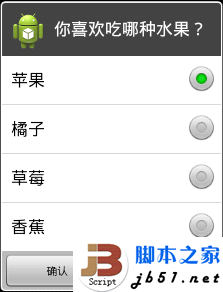
@Override public void onClick(DialogInterface dialog, int which) { selectedFruitIndex = which; } }). setPositiveButton("確認(rèn)", new DialogInterface.OnClickListener() { @Override public void onClick(DialogInterface dialog, int which) { Toast.makeText(Dialog_AlertDialogDemoActivity.this, arrayFruit[selectedFruitIndex], Toast.LENGTH_SHORT).show(); } }). setNegativeButton("取消", new DialogInterface.OnClickListener() { @Override public void onClick(DialogInterface dialog, int which) { // TODO Auto-generated method stub } }). create(); alertDialog.show(); } } 運(yùn)行結(jié)果如下:
五、類似CheckBox的AlertDialog 用setMultiChoiceItems(CharSequence[] items, boolean[] checkedItems, final OnMultiChoiceClickListener listener)方法來(lái)實(shí)現(xiàn)類似CheckBox的AlertDialog 第一個(gè)參數(shù)是要顯示的數(shù)據(jù)的數(shù)組,第二個(gè)參數(shù)是選中狀態(tài)的數(shù)組,第三個(gè)參數(shù)是點(diǎn)擊某個(gè)item的觸發(fā)事件
public class Dialog_AlertDialogDemoActivity extends Activity { /** Called when the activity is first created. */ @Override public void onCreate(Bundle savedInstanceState) { super.onCreate(savedInstanceState); setContentView(R.layout.main);
final String[] arrayFruit = new String[] { "蘋(píng)果", "橘子", "草莓", "香蕉" }; final boolean[] arrayFruitSelected = new boolean[] {true, true, false, false};
Dialog alertDialog = new AlertDialog.Builder(this). setTitle("你喜歡吃哪種水果?"). setIcon(R.drawable.ic_launcher) .setMultiChoiceItems(arrayFruit, arrayFruitSelected, new DialogInterface.OnMultiChoiceClickListener() {
@Override public void onClick(DialogInterface dialog, int which, boolean isChecked) { arrayFruitSelected[which] = isChecked; } }). setPositiveButton("確認(rèn)", new DialogInterface.OnClickListener() {
@Override public void onClick(DialogInterface dialog, int which) { StringBuilder stringBuilder = new StringBuilder(); for (int i = 0; i < arrayFruitSelected.length; i++) { if (arrayFruitSelected[i] == true) { stringBuilder.append(arrayFruit[i] + "、"); } } Toast.makeText(Dialog_AlertDialogDemoActivity.this, stringBuilder.toString(), Toast.LENGTH_SHORT).show(); } }). setNegativeButton("取消", new DialogInterface.OnClickListener() {
@Override public void onClick(DialogInterface dialog, int which) { // TODO Auto-generated method stub } }). create(); alertDialog.show(); } } package com.tianjf; import android.app.Activity; import android.app.AlertDialog; import android.app.Dialog; import android.content.DialogInterface; import android.os.Bundle; import android.widget.Toast; public class Dialog_AlertDialogDemoActivity extends Activity { /** Called when the activity is first created. */ @Override public void onCreate(Bundle savedInstanceState) { super.onCreate(savedInstanceState); setContentView(R.layout.main); final String[] arrayFruit = new String[] { "蘋(píng)果", "橘子", "草莓", "香蕉" }; final boolean[] arrayFruitSelected = new boolean[] {true, true, false, false}; Dialog alertDialog = new AlertDialog.Builder(this). setTitle("你喜歡吃哪種水果?"). setIcon(R.drawable.ic_launcher) .setMultiChoiceItems(arrayFruit, arrayFruitSelected, new DialogInterface.OnMultiChoiceClickListener() {
@Override public void onClick(DialogInterface dialog, int which, boolean isChecked) { arrayFruitSelected[which] = isChecked; } }). setPositiveButton("確認(rèn)", new DialogInterface.OnClickListener() { @Override public void onClick(DialogInterface dialog, int which) { StringBuilder stringBuilder = new StringBuilder(); for (int i = 0; i < arrayFruitSelected.length; i++) { if (arrayFruitSelected[i] == true) { stringBuilder.append(arrayFruit[i] + "、"); } } Toast.makeText(Dialog_AlertDialogDemoActivity.this, stringBuilder.toString(), Toast.LENGTH_SHORT).show(); } }). setNegativeButton("取消", new DialogInterface.OnClickListener() { @Override public void onClick(DialogInterface dialog, int which) { // TODO Auto-generated method stub } }). create(); alertDialog.show(); } }運(yùn)行結(jié)果如下:
public class Dialog_AlertDialogDemoActivity extends Activity { /** Called when the activity is first created. */ @Override public void onCreate(Bundle savedInstanceState) { super.onCreate(savedInstanceState); setContentView(R.layout.main);
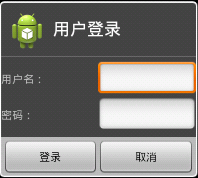
Dialog alertDialog = new AlertDialog.Builder(this). setTitle("用戶登錄"). setIcon(R.drawable.ic_launcher). setView(myLoginView). setPositiveButton("登錄", new DialogInterface.OnClickListener() {
@Override public void onClick(DialogInterface dialog, int which) { // TODO Auto-generated method stub } }). setNegativeButton("取消", new DialogInterface.OnClickListener() {
@Override public void onClick(DialogInterface dialog, int which) { // TODO Auto-generated method stub } }). create(); alertDialog.show(); } } package com.tianjf; import android.app.Activity; import android.app.AlertDialog; import android.app.Dialog; import android.content.DialogInterface; import android.os.Bundle; import android.view.LayoutInflater; import android.view.View; public class Dialog_AlertDialogDemoActivity extends Activity { /** Called when the activity is first created. */ @Override public void onCreate(Bundle savedInstanceState) { super.onCreate(savedInstanceState); setContentView(R.layout.main); // 取得自定義View LayoutInflater layoutInflater = LayoutInflater.from(this); View myLoginView = layoutInflater.inflate(R.layout.login, null);