今天向朋友們推薦Maya建模--LCD顯示器建模教程,教程介紹的制作步驟很詳細,不過是英文教程,所以朋友們在學習是還要下一點功夫,希望教程對朋友們有所幫助!
this tutorial will teach you how to model a basic lcd screen in maya using some of the very basic tools such as the extrude tool, the scale tool, the move tool, and the split polygon object tool. this is a beginner tutorial and you are not required to have anything more than basic knowledge on how to use maya. in the first page of this tutorial you will create the main shape of our lcd screen and the second page will describe the way to create the extra details such as the stand and the buttons. an example of what you can make by following this tutorial is illustrated in the image below.

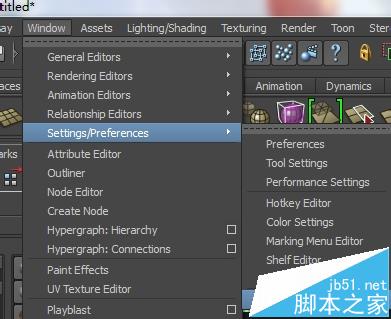
start off by creating a new scene (file;new) and make sure that you have set the ui menu to the ;modeling; set (window;setting/preferences;preferences)
access the ;create; menu by going through ;polygon primitives; and then click on the small cubic icon next to ;cube; to insert a custom-made cube that should make up the screen part of our object. an option window should pop-up, use the values showed in the image below for the width, height, and depth and then click ;create;.


You should get a result similar to the one in the first image below. Right-click the model and drag your mouse while holding the right-click button to show the object transform menu. select ;Face; to select the face part of our model. The selection colour of our object should change.


We will now start our extrusion process, use the ;Move tool;  to select the centre of the face of the cube. Go through the ;Edit Polygons; dropdown menu and pick ;Extrude Face;. This will create another layer that you can pull out using the ;Move too;, use the ;Scale tool;
  to pull the the new layer inwards as illustrated in the image below. This will require you to reduce the size on the y and x axis separately.


repeat the process again, use extrude face, and then move and scale to get a smaller bump on our object as illustrated in the image below.

repeat the process for a third time to get a result similar to the image illustrated below.

we will now leave the back for now and do the display part of our monitor. rotate the camera (alt+left mouse click) to view the front part of the monitor, select the centre of the face using the move tool and then extrude it. scale it down a little bit as illustrated in the image below and then apply extrude once more. move this new layer backwards using the move tool.


congratulations! this completed the basic shape of our monitor, the second part of our tutorial will describe the creation of the stand and the extra details of the object such as buttons, etc. click on the next page link below to continue.
rotate the viewport to the lower back of our lcd screen. select the lower side of the last bump of the monitor using the move tool. extrude this face and reduce it in size.

新聞熱點




疑難解答