在做視頻開發時遇到屏幕旋轉問題,其中涉及到 StatusBar、 UINavigationController、UITabBarController 、UIViewcontroller 。
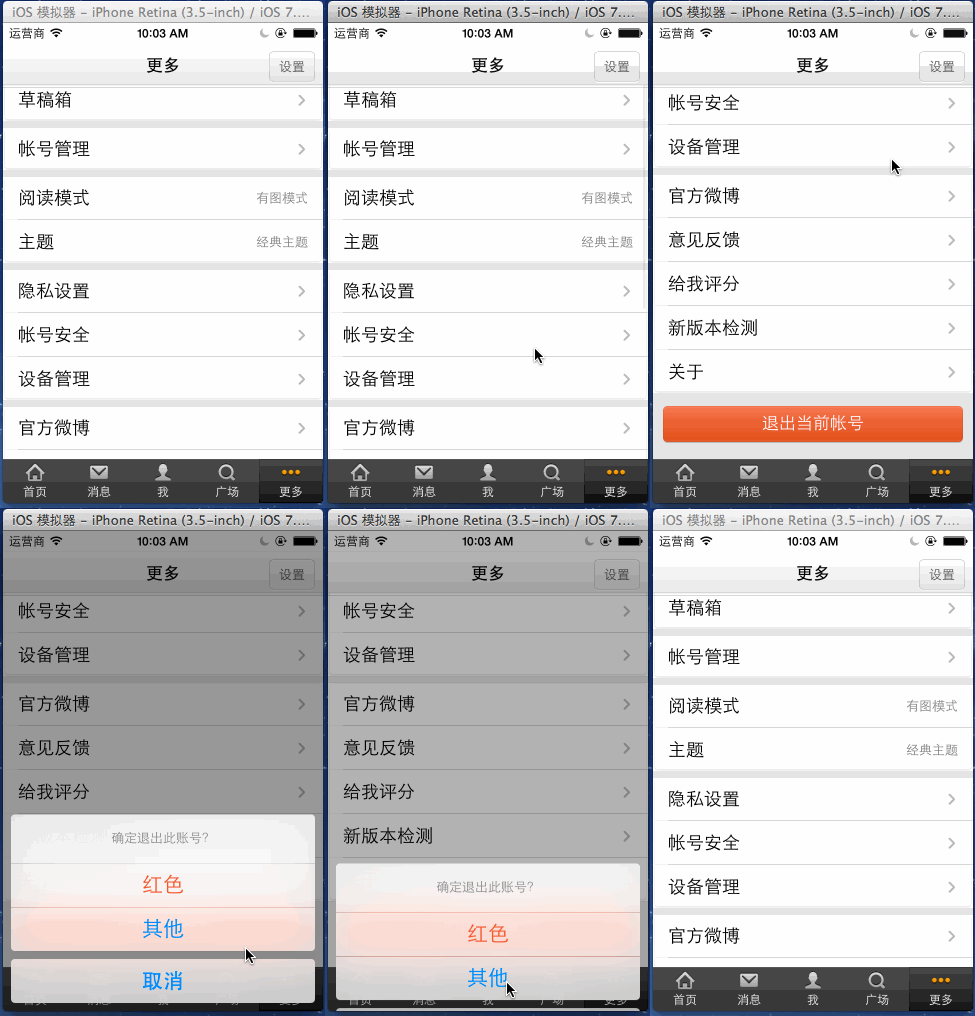
在設備鎖屏下的整體效果圖
iOS-旋轉.gif
主要涉及以下4點:
1、橫豎屏旋轉
第1步:
-(UIInterfaceOrientationMask)application:(UIApplication *)application supportedInterfaceOrientationsForWindow:(UIWindow *)window {// NSLog(@"0000000---------%@",NSStringFromClass([[self topViewController] class]));// if ([NSStringFromClass([[self topViewController] class]) isEqualToString:@"FirstViewController"]) {// //橫屏// return UIInterfaceOrientationMaskLandscapeRight;// }// //豎屏// return UIInterfaceOrientationMaskPortrait; NSUInteger orientations = UIInterfaceOrientationMaskAllButUpsideDown; if(self.window.rootViewController){ //取出當前顯示的控制器 UIViewController *presentedViewController = [self topViewControllerWithRootViewController:self.window.rootViewController]; //按當前控制器支持的方向確定旋轉方向(將旋轉方向重新交給每個控制器自己控制) NSLog(@"%s, line = %d",__FUNCTION__,__LINE__); orientations = [presentedViewController supportedInterfaceOrientations]; } return orientations;}//獲取界面最上層的控制器//- (UIViewController*)topViewController {// NSLog(@"%s, line = %d",__FUNCTION__,__LINE__);// return [self topViewControllerWithRootViewController:[UIApplication sharedApplication].keyWindow.rootViewController];//}//一層一層的進行查找判斷- (UIViewController*)topViewControllerWithRootViewController:(UIViewController*)rootViewController { NSLog(@"%s, line = %d",__FUNCTION__,__LINE__); if ([rootViewController isKindOfClass:[UITabBarController class]]) { UITabBarController* tabBarController = (UITabBarController*)rootViewController; NSLog(@"Tabbar:%@",NSStringFromClass([tabBarController.selectedViewController class])); return [self topViewControllerWithRootViewController:tabBarController.selectedViewController]; } else if ([rootViewController isKindOfClass:[UINavigationController class]]) { UINavigationController* nav = (UINavigationController*)rootViewController; NSLog(@"nav:%@",NSStringFromClass([nav.visibleViewController class])); return [self topViewControllerWithRootViewController:nav.visibleViewController]; } else if (rootViewController.presentedViewController) { NSLog(@"present:%@",NSStringFromClass([rootViewController.presentationController class])); UIViewController* presentedViewController = rootViewController.presentedViewController; return [self topViewControllerWithRootViewController:presentedViewController]; } else { NSLog(@"root:%@",rootViewController); return rootViewController; }} 代碼中通過 -(UIInterfaceOrientationMask)application:(UIApplication *)application supportedInterfaceOrientationsForWindow:(UIWindow *)window 方法將控制器交給自己控制,該方法默認值為 Info.plist 中配置的 Supported interface orientations 項的值。
第2步:在各控制器設置支持的方向
//是否允許旋轉(默認允許)- (BOOL)shouldAutorotate { return YES;}- (UIInterfaceOrientationMask)supportedInterfaceOrientations{ //允許旋轉的方向 return UIInterfaceOrientationMaskAll;} 其中 - supportedInterfaceOrientations 方法在 iPad 中默認取值為 UIInterfaceOrientationMaskAll ,即默認支持所有屏幕方向;而 iPhone 跟 iPod Touch 的默認取值為 UIInterfaceOrientationMaskAllButUpsideDown ,即支持除豎屏向下以外的三個方向。
在設備屏幕旋轉時,系統會調用 - shouldAutorotate 方法檢查當前界面是否支持旋轉,只有 - shouldAutorotate 返回 YES 的時候, - supportedInterfaceOrientations 方法才會被調用,以確定是否需要旋轉界面。
這個是 TabbarController 中設置的,它會影響關聯的 UIViewController 的支持方向,需要在 UIViewController中進一步設置
//此方法來控制能否橫豎屏 控制鎖屏 - (UIInterfaceOrientationMask)supportedInterfaceOrientations { NSLog(@"%s, line = %d",__FUNCTION__,__LINE__); UIInterfaceOrientationMask inter; if (_lockScreen) { switch (_lockOrientation) { case 1: inter = UIInterfaceOrientationMaskPortrait; break; case 2: inter = UIInterfaceOrientationMaskPortraitUpsideDown; break; case 3: inter = UIInterfaceOrientationMaskLandscapeRight; break; case 4: inter = UIInterfaceOrientationMaskLandscapeLeft; break; default:inter = UIInterfaceOrientationMaskAll; break; } } else { inter = UIInterfaceOrientationMaskAll; } //支持全部方向 return inter; }第3步:強制轉換控制器方向
- (void)setInterOrientation:(UIInterfaceOrientation)orientation { if ([[UIDevice currentDevice] respondsToSelector:@selector(setOrientation:)]) { SEL selector = NSSelectorFromString(@"setOrientation:"); NSInvocation *invocation = [NSInvocation invocationWithMethodSignature:[UIDevice instanceMethodSignatureForSelector:selector]]; [invocation setSelector:selector]; [invocation setTarget:[UIDevice currentDevice]]; int val = orientation; // 從2開始是因為0 1 兩個參數已經被selector和target占用 [invocation setArgument:&val atIndex:2]; [invocation invoke]; } }這樣就可以完成橫豎屏的切換。
2、屏幕旋轉相應改變視圖位置
這里先擴展 UIDeviceOrientation & UIInterfaceOrientation 的知識
UIDeviceOrientation 設備的物理方向
UIDeviceOrientation 即我們手持的移動設備的 Orientation ,是一個三圍空間,有六個方向,通過 [UIDevice currentDevice].orientation 獲取當前設備的方向。
typedef NS_ENUM(NSInteger, UIDeviceOrientation) { UIDeviceOrientationUnknown, UIDeviceOrientationPortrait, UIDeviceOrientationPortraitUpsideDown, // Device oriented vertically, home button on the top 豎屏向下,即頭在下,Home 鍵在上 UIDeviceOrientationLandscapeLeft, // Device oriented horizontally, home button on the right 橫屏頭在左,Home鍵在右 UIDeviceOrientationLandscapeRight, // Device oriented horizontally, home button on the left 橫屏頭在右,Home鍵在左 UIDeviceOrientationFaceUp, // Device oriented flat, face up UIDeviceOrientationFaceDown // Device oriented flat, face down} ; UIInterfaceOrientation 界面的顯示方向
UIInterfaceOrientation 即我們看到的視圖的 Orientation ,可以理解為 statusBar 所在的方向,是一個二維空間,有四個方向, 通過 [UIApplication sharedApplication].statusBarOrientation 即狀態欄的方向獲取當前界面方向。
// Note that UIInterfaceOrientationLandscapeLeft is equal to UIDeviceOrientationLandscapeRight (and vice versa).// This is because rotating the device to the left requires rotating the content to the right.typedef NS_ENUM(NSInteger, UIInterfaceOrientation) { UIInterfaceOrientationUnknown = UIDeviceOrientationUnknown, UIInterfaceOrientationPortrait = UIDeviceOrientationPortrait, UIInterfaceOrientationPortraitUpsideDown = UIDeviceOrientationPortraitUpsideDown, UIInterfaceOrientationLandscapeLeft = UIDeviceOrientationLandscapeRight, UIInterfaceOrientationLandscapeRight = UIDeviceOrientationLandscapeLeft} UIInterfaceOrientationMask 支持的方向
// iOS 6 之后用于控制界面的枚舉值typedef NS_OPTIONS(NSUInteger, UIInterfaceOrientationMask) { UIInterfaceOrientationMaskPortrait = (1 << UIInterfaceOrientationPortrait), UIInterfaceOrientationMaskLandscapeLeft = (1 << UIInterfaceOrientationLandscapeLeft), UIInterfaceOrientationMaskLandscapeRight = (1 << UIInterfaceOrientationLandscapeRight), UIInterfaceOrientationMaskPortraitUpsideDown = (1 << UIInterfaceOrientationPortraitUpsideDown), UIInterfaceOrientationMaskLandscape = (UIInterfaceOrientationMaskLandscapeLeft | UIInterfaceOrientationMaskLandscapeRight), UIInterfaceOrientationMaskAll = (UIInterfaceOrientationMaskPortrait | UIInterfaceOrientationMaskLandscapeLeft | UIInterfaceOrientationMaskLandscapeRight | UIInterfaceOrientationMaskPortraitUpsideDown), UIInterfaceOrientationMaskAllButUpsideDown = (UIInterfaceOrientationMaskPortrait | UIInterfaceOrientationMaskLandscapeLeft | UIInterfaceOrientationMaskLandscapeRight),}由上可以發現:
iOS 6 及之后版本使用的 UIInterfaceOrientationMask 類型來控制屏幕屏幕方向,該類型也新增加了幾個枚舉取值,可用一個枚舉取值來代表多個屏幕方向,使用起來更方便。
注意在 UIInterfaceOrientation 中有注釋
Note that UIInterfaceOrientationLandscapeLeft is equal to UIDeviceOrientationLandscapeRight (and vice versa).
This is because rotating the device to the left requires rotating the content to the right,大意是界面的左轉相當于設備的右轉,如果設備向左轉時就需要內容(即界面)向右轉。即:
UIInterfaceOrientationLandscapeLeft = UIDeviceOrientationLandscapeRight
UIInterfaceOrientationLandscapeRight = UIDeviceOrientationLandscapeLeft
下面還會舉例說明。
其實 UIDeviceOrientation 與 UIInterfaceOrientation 是兩個互不相干的屬性,通常情況下會一起出現,在這里正好利用此特性在屏幕旋轉后進行重新布局。
第1步:監聽 UIDeviceOrientationDidChangeNotification 狀態
//監聽設備旋轉 改變 視圖 對應位置 [[NSNotificationCenter defaultCenter] addObserver:self selector:@selector(deviceOrientationDidChange) name:UIDeviceOrientationDidChangeNotification object:nil];//用來控制橫豎屏時調整視圖位置- (void)deviceOrientationDidChange{ [self isPortrait]; }第2步:重新布局
if (_interOrientation == UIInterfaceOrientationPortrait || _interOrientation == UIInterfaceOrientationPortraitUpsideDown) { self.top.constant = 145; self.bottom.constant = 210; } else if (_interOrientation == UIInterfaceOrientationLandscapeRight || _interOrientation == UIInterfaceOrientationLandscapeLeft) { self.top.constant = 40; self.bottom.constant = 50; }例如:豎屏轉橫屏
界面豎屏 UIInterfaceOrientationPortrait ->橫屏 UIInterfaceOrientationLandscapeRight ,設備方向 UIDeviceOrientationPortrait -> UIDeviceOrientationLandscapeLeft ,在設備發生變化這個過程觸發 UIDeviceOrientationDidChangeNotification 監聽,然后進行重新布局。
3、旋轉時狀態欄的隱藏與顯示
這里只記述旋轉時狀態欄的變化,由豎屏想橫屏變化時狀態欄會消失。
//在需要的`UIViewController`設置是否隱藏- (BOOL)prefersStatusBarHidden { NSLog(@"%s, line = %d",__FUNCTION__,__LINE__); return NO;}4、鎖屏
鎖屏時,不管系統鎖屏是否關閉、Push 或 Present 返回后,界面依然保持不變。
第1步:設置鎖屏
- (IBAction)lockAction:(UIButton *)sender { if (_lockScreen) { _lockScreen = NO; [sender setTitle:@"鎖定屏幕" forState:UIControlStateNormal]; } else { _lockScreen = YES; [sender setTitle:@"解開屏幕" forState:UIControlStateNormal]; } _lockOrientation = _interOrientation; }第2步:繞過強轉
- (void)interfaceOrientation:(UIInterfaceOrientation)orientation { [self isPortrait]; //鎖屏情況下 不旋轉 if (!_lockScreen) { [self setInterOrientation:orientation]; }第3步:針對 Push 或 Present 返回后
- (void)viewWillAppear:(BOOL)animated { if (_lockScreen) { //記錄返回時的界面狀態 [self setInterOrientation:_lockOrientation]; } else { [self isPortrait]; } } 5、 針對特定 UIViewController 方向的支持
-(UIInterfaceOrientationMask)application:(UIApplication *)application supportedInterfaceOrientationsForWindow:(UIWindow *)window { if ([NSStringFromClass([[self topViewController] class]) isEqualToString:@"FirstViewController"]) { //橫屏 return UIInterfaceOrientationMaskLandscapeRight; } //豎屏 return UIInterfaceOrientationMaskPortrait; }最后的獻上 GitHub 代碼,還有2個小的 bug ,有興趣的朋友歡迎來探討。
以上就是本文的全部內容,希望對大家的學習有所幫助,也希望大家多多支持VEVB武林網。
新聞熱點






疑難解答